
Skip to content
  • Home
  • Plugins
    • Product Gallery Slider for WooCommerce
    • Deposits for WooCommerce
  • Docs
  • Blog
  • Support
Account

Getting Started

8
  • Can I use my license on a test or development site?
  • Where Is My Purchase Code?
  • How to Install the PRO version?
  • How to update the PRO version?
  • Where can I cancel my subscription?
  • How can I get an invoice for my order?
  • How to remove VAT or Sales Tax from Paddle?
  • Enabling usage tracking

Product Gallery Slider

13
  • How To Fix WooCommerce Blurry Images?
  • How to use gallery slider with WPML?
  • High CLS issue in mobile devices
  • Add Additional Variation Images in WooCommerce?
  • How to enable a lightbox popup on clicking the large image?
  • How to Add Video into Product Gallery?
  • How to use the Product gallery slider with Elementor Page builder?
  • How to use product gallery slider with Divi Page builder?
  • How to center the video play icon?
  • What is the difference between classic and Default Variation behavior options?
  • YITH WooCommerce Color and Label Variations Conflict
  • Conflicts with other themes & plugins
  • Hooks: Actions and Filters

Bayna - Deposits for WooCommerce

17
  • How to apply dynamic rules for cart based deposit order?
  • How coupons work when the deposit option Is enabled?
  • How to create and manage Deposits as an admin?
  • Translate deposit plugin using Loco Translate
  • Switch to WooCommerce Classic Checkout & Cart
  • Custom amounts for deposit order
  • Future/due Payment for Deposit orders
  • Set up deposit payment reminders for customers
  • Cart or Checkout based deposit
  • Deposit Payment Plans for WooCommerce
  • Enable the Deposit/partial payment feature for the Product
  • Disable Payment Gateways on the Checkout page
  • Customize Email Templates for Deposit Orders
  • Deposit amount conflict with the “WooCommerce PayPal Payments” plugin
  • Nothing is being created in the Woocommerce > Deposit Payments!
  • Changelog
  • For Developers

Medixer – Medical WordPress Theme

11
  • Getting Started
  • Theme Setup
  • Install theme demo content
  • Theme options
  • Menu Setup
  • Add Team Member
  • Add Services & Portfolio
  • How to use Elementor Page Builder?
  • Speed optimization
  • Change the slug for custom post types?
  • Change Log

Wishlist for WooCommerce

5
  • Getting Started
  • Plugin Settings
  • Shortcodes
  • Overwrite Wishlist Template
  • For Developers

Quick Buy Now Button for WooCommerce

1
  • Buy Now Button for WooCommerce – Complete Documentation
View Categories
  • Home
  • Docs
  • Bayna - Deposits for WooCommerce
  • Set up deposit payment reminders for customers

Set up deposit payment reminders for customers

Niloy
Updated on April 13, 2025

Since version 2.0.2, we added two modes for sending the due reminder email to customers.

Days after the first payment #

suppose a customer order a deposit product on 1 June, and the shop admin sets a reminder date to 7. now, the customer will receive an email notification after seven days, which means on 8 June.

support-2021-06-21-at-19.43.43.gif


Based on order status #

in this mode, the reminder email will send when the order status manually changes from “Deposit Payment” to “Selected Order status from reminder option.”

support-2021-06-21-at-20.02.31.gif


This mode is beneficial for those shop owner who takes custom orders for products or delivers products globally.

Manual Deposit Reminder #

Like the default WooCommerce Order actions, now it’s also possible to send reminders.

support-2021-06-24-at-23.48.11.gif

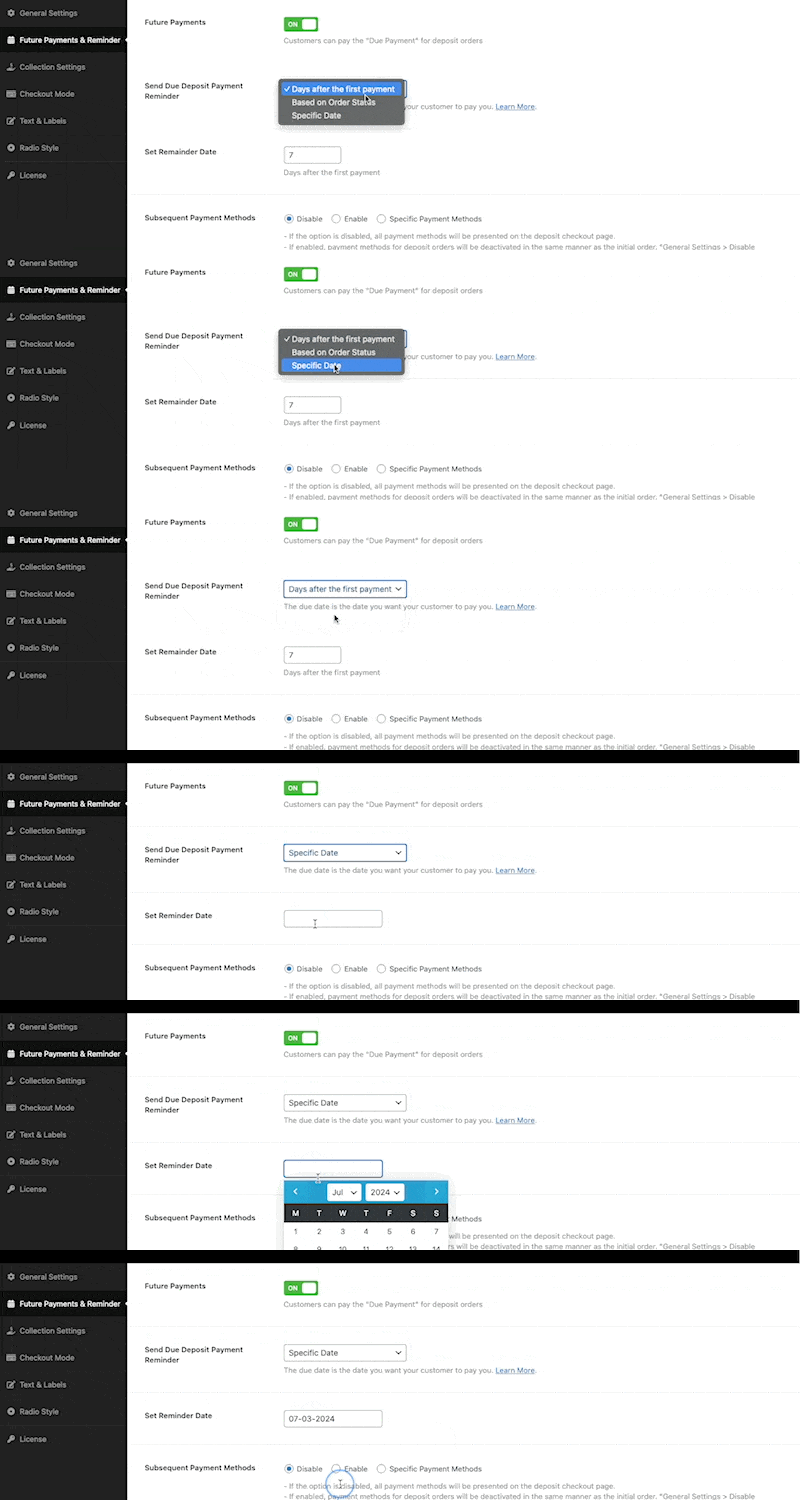
Specific Date #

Set a particular date for sending payment reminder emails.
 

Bayna, Pro
Future/due Payment for Deposit ordersCart or Checkout based deposit
ON THIS PAGE
  • Days after the first payment
  • Based on order status
  • Manual Deposit Reminder
  • Specific Date

Share This Article :

  • Facebook
  • X
  • LinkedIn
  • Pinterest

Was it helpful ?

  • Happy
  • Normal
  • Sad

Need Help?

support@codeixer.com

Useful Links
  • Terms & Conditions
  • Refund Policy
  • Privacy Statement
  • License Terms
  • Password Reset Link
  • Affiliates FAQ
  • Affiliate Account
  • Become an Affiliate
2018 – 2026 Codeixer LLC. All rights reserved.